Every outbound program sits on top of one boring question: does the email land in the inbox? If it doesn't, the list, the research agent and the copy are wasted. Sending infrastructure is the first of the six machines we teach, M1, because everything downstream depends on it. This post covers how we set it up at Sparq Labs: why we never send cold email from the main domain, how we buy domains and mailboxes, how warm-up and daily limits work, and the checklist we run before pressing send.
None of this is secret. Most of it is widely accepted practice among cold email operators. The difference between teams that land and teams that don't is usually discipline: doing every step, on every domain, every time.
Why we never send from the main domain
Your main domain carries invoices, customer support, password resets, hiring email and every conversation your team has with existing customers. Mailbox providers judge a domain by how recipients react to its mail. Cold email gets ignored, deleted and sometimes marked as spam far more often than normal business email does. Run cold volume from the main domain and you put all of that other mail at risk.
So cold email goes out from secondary domains that exist only for outbound. If one of them gets a bad reputation, you retire it and bring a warmed spare into rotation. The main domain never notices.
Buying sending domains
Buy domains that read as clearly yours. A prospect who sees an unfamiliar domain should still recognise the brand. Common patterns for a company called Acme:
- Prefixes: getacme.com, tryacme.com, joinacme.com
- Suffixes: acmehq.com, acmeteam.com, acmelabs.com
- Close variants: useacme.com, meetacme.com
A few rules we follow:
- Prefer .com, or the TLD your buyers already trust. Avoid cheap novelty TLDs.
- No hyphens, no numbers, nothing that looks like a typo of a famous brand.
- Redirect every sending domain to your main website, so anyone who checks it lands somewhere real.
- Buy one or two spare domains at the same time and warm them with the rest. When a domain needs to rest, the spare is ready.
- Keep a sheet with every domain, its registrar, purchase date, provider and status. You will need it within a month.
SPF, DKIM and DMARC
Authentication tells receiving servers that a message from your domain was really sent by you. Every sending domain needs all three records before a single email goes out. Google and Yahoo now expect authenticated mail with a DMARC record from anyone sending at volume, and Microsoft has moved the same way.
- SPF lists the servers allowed to send for the domain. One SPF record per domain, with the include for your mailbox provider.
- DKIM signs each message with a key published in DNS. Generate it in the provider's admin console and publish the record it gives you.
- DMARC tells receivers what to do when SPF or DKIM fails, and where to send reports. Start with a monitoring policy and a reporting address.
Typical records look like this. Replace the domain and use the exact values your provider gives you.
# SPF (TXT on the root of the sending domain)
Google Workspace:  v=spf1 include:_spf.google.com ~all
Microsoft 365:     v=spf1 include:spf.protection.outlook.com ~all

# DKIM
Google Workspace:  TXT  google._domainkey      (value from the Admin console)
Microsoft 365:     CNAME selector1._domainkey  and  selector2._domainkey

# DMARC (TXT at _dmarc.getacme.com)
v=DMARC1; p=none; rua=mailto:dmarc@getacme.com
Check each domain with a DNS lookup tool after publishing. A missing DKIM record or two SPF records on one domain are the most common errors we find in audits, and both are invisible until deliverability drops.
Tracking: a custom domain, or none
Open tracking works by adding a tiny image to every email. Click tracking rewrites your links through a tracking domain. Both add signals that filters notice, and by default many sequencers route them through a shared tracking domain used by thousands of other senders. If one of those senders behaves badly, you share the damage.
You have two good options:
- Turn tracking off. This is our default for first-touch cold email. Step one is plain text with no link, so click tracking has nothing to track. Open rates are unreliable anyway, because some mail apps load images automatically and inflate them.
- Use a custom tracking domain. If you need click data on a later step, set up a CNAME on a subdomain of each sending domain, such as track.getacme.com, as your sequencer's docs describe.
Measure the program on replies, positive replies and opportunities. Those numbers don't depend on tracking at all.
Mailboxes and the Azure and Google split
We put 2–3 mailboxes on each sending domain. More than that concentrates too much volume on one domain's reputation. Fewer means buying more domains than you need.
We also split mailboxes across the two big providers: Google Workspace and Microsoft 365. The curriculum calls this the Azure and Google split. It does two jobs. It spreads risk, so a policy change or a bad week at one provider doesn't stop the whole program. And many prospects sit on one of the two, so having senders on both lets you compare placement and, in sequencers that support it, match sender provider to recipient provider.
Set each mailbox up like a real colleague's:
- A real person's name, consistent across the mailbox, the signature and the copy.
- A profile photo.
- A short plain-text signature: name, role, company. No images, no banners, no row of links.
- Forwarding or a shared view so replies never sit unread in a mailbox nobody opens.
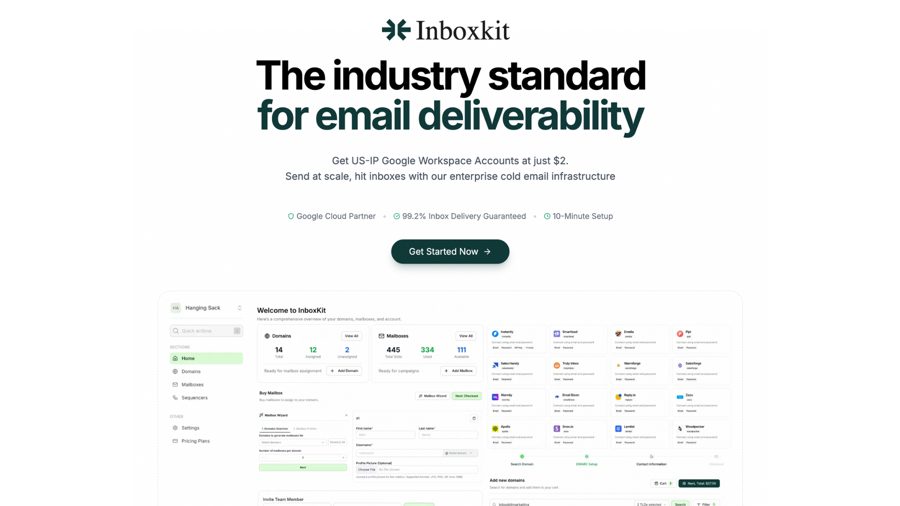
Creating dozens of mailboxes by hand is slow and error-prone. We use Inboxkit to provision Google and Microsoft mailboxes and set the DNS records, then connect them to the sequencer.
Warm-up: two to three weeks, no shortcuts
A new mailbox on a new domain has no history. If it sends a full day of cold email on day one, filters treat it as suspicious. Warm-up builds history first. The mailbox exchanges a small, rising number of emails with other real mailboxes in a warm-up network. Those messages get opened, replied to and moved out of spam.
- Length: plan for about two to three weeks before any cold email goes out. Book this time into the launch plan. Teams that skip it pay for it later.
- Tools: sequencers such as Instantly, Smartlead and EmailBison include warm-up. Turn it on the day the mailbox is connected.
- Keep it running: leave warm-up on at a low level after launch, so the mailbox keeps a steady base of positive engagement alongside cold sends.
- Ramp the cold volume: when cold sending starts, begin well below your daily limit and step up over the first couple of weeks.
Daily limits, rotation and the capacity math
Keep cold volume per mailbox conservative. A commonly cited range is about 30–50 cold emails per mailbox per day. Treat that as a starting point. Start near the low end, watch bounces and replies, and only move up when the numbers stay clean. Volume comes from adding mailboxes. Pushing more through each one only burns them faster.
Inbox rotation spreads a campaign across many mailboxes, so no single sender carries the load. Every sequencer we use supports it. Follow-ups should go from the same mailbox as the first step, in the same thread.
Worked example
Say you want to reach 500 new prospects a week with a three-step sequence on days 0, 3 and 7.
- Each prospect can receive up to 3 emails, so plan for up to 1,500 emails a week. Replies and bounces will cut this a little. Plan for the full number anyway.
- Over 5 sending days, that is 300 emails a day.
- At 30 per mailbox per day, you need 10 mailboxes.
- Add headroom for mailboxes that are resting or still warming: call it 12.
- At 3 mailboxes per domain, that is 4 domains. Split them: 2 domains on Google Workspace with 6 mailboxes, 2 on Microsoft 365 with 6 mailboxes.
- Buy 1–2 spare domains and warm them alongside.
Run this math before buying anything. Most overspending on infrastructure comes from buying mailboxes first and doing the math later.
Verify the list before it touches a mailbox
Bounces are one of the fastest ways to damage a new mailbox. A list straight out of a database will contain addresses that no longer exist. Verify every address before it enters a campaign.
- Run every email through a verifier, even if the enrichment provider marked it as found. The email waterfall in the list engine stops at the first verified result, which helps. Verify again if the list has sat for a few weeks.
- Treat catch-all domains, where the server accepts any address, as a risk. Send to them in small batches from your healthiest mailboxes, or leave them out of a new domain's first weeks.
- Remove role addresses such as info@ and sales@ from cold campaigns.
- Deduplicate against your CRM, current customers and anyone who has asked not to be contacted.
Monitoring after launch
Infrastructure is never finished. It needs a short daily check and a longer weekly one.
Daily:
- Bounces by mailbox. If one mailbox spikes, pause it and check the list segment it was sending to.
- Replies, including angry ones. A run of "how did you get my email" replies points at the list.
- Spam complaints and unsubscribes. Google's sender guidelines ask senders to keep reported spam well below 0.3%. Aim far lower.
Weekly:
- Inbox placement tests on a sample of mailboxes, across Google and Microsoft recipients.
- Blacklist checks for every sending domain.
- Warm-up health scores in the sequencer.
- Reply rate by mailbox and domain. A domain whose reply rate falls while others hold is often landing in spam.
When a domain is clearly damaged, rest it or retire it and bring a warmed spare in. Fighting a burnt domain back to health usually costs more than replacing it.
Plain text helps deliverability too
Infrastructure and copy meet in the email itself. Our default first touch is short, plain text, with no images, no attachments and no link. That keeps the message looking like one person writing to another, which is what it is. Use custom variables carefully: a broken merge field such as "Hi {first_name}" in a live send is a reply killer and a spam signal. Spot-check rendered previews from the sequencer before every launch. The full copy rules are in The three-step cadence we write by.
The cost sheet
Every GTME.School student leaves week one with a cost sheet for their own volume, built before they buy anything. The structure is simple. Prices change often, so fill in the current figures from each vendor yourself.
| Line item | Unit | Quantity in the worked example |
|---|---|---|
| Sending domains | Per domain, per year | 4 active + 1–2 spare |
| Google Workspace mailboxes | Per mailbox, per month | 6 |
| Microsoft 365 mailboxes | Per mailbox, per month | 6 |
| Mailbox setup (for example Inboxkit) | Per mailbox or per plan | 12, plus spares |
| Sequencer with warm-up (EmailBison, Smartlead or Instantly) | Per plan, per month | A plan that covers 12+ mailboxes and your contact volume |
| Email verification | Per address checked | About 500 a week, plus re-checks |
| Placement and blacklist monitoring | Per plan, per month | All sending domains |
Two habits keep the sheet honest. Divide the monthly total by the number of new prospects you actually reach, so you know your cost per contacted lead. And review it every month, because unused mailboxes and forgotten domains keep billing.
The pre-send checklist
This is the checklist we run on every new campaign before pressing send. Copy it.
DOMAINS
[ ] Main company domain is not used for any cold sending
[ ] Every sending domain redirects to the main website
[ ] SPF: exactly one record per domain, correct provider include
[ ] DKIM: published and passing for every domain
[ ] DMARC: record present with a reporting address
[ ] Tracking off, or a custom tracking domain per sending domain

MAILBOXES
[ ] 2-3 mailboxes per domain, split across Google and Microsoft
[ ] Real name, photo and plain-text signature on every mailbox
[ ] Warm-up has run for 2-3 weeks and is still on
[ ] Daily cold limit set per mailbox (start around 30)
[ ] Inbox rotation on; follow-ups thread from the same mailbox
[ ] Replies reach a person who checks them several times a day

LIST
[ ] Every address verified; catch-alls handled separately
[ ] Role addresses removed
[ ] Deduplicated against CRM, customers and do-not-contact list

COPY
[ ] Plain text, no images or attachments, no link in step one
[ ] Rendered previews checked for broken variables
[ ] Unsubscribe or opt-out line present

MONITORING
[ ] Daily bounce and reply check owned by a named person
[ ] Weekly placement and blacklist check scheduled
[ ] Spare warmed domains ready
Common mistakes
- Testing on the main domain "just once". It is never once, and it is the one domain you cannot replace.
- Skipping warm-up to hit a launch date. Move the launch date instead. Two lost weeks are cheaper than a burnt set of domains.
- Raising per-mailbox limits to get more volume. Add mailboxes and domains. Keep per-mailbox volume conservative.
- Sending to an unverified list. A burst of bounces in week one can undo the whole warm-up.
- All mailboxes on one provider. One policy change and the whole program stops.
- Nobody owns monitoring. Problems compound for weeks before anyone notices a falling reply rate.
- Buying before doing the math. Run the capacity math and the cost sheet first.
Before you press send
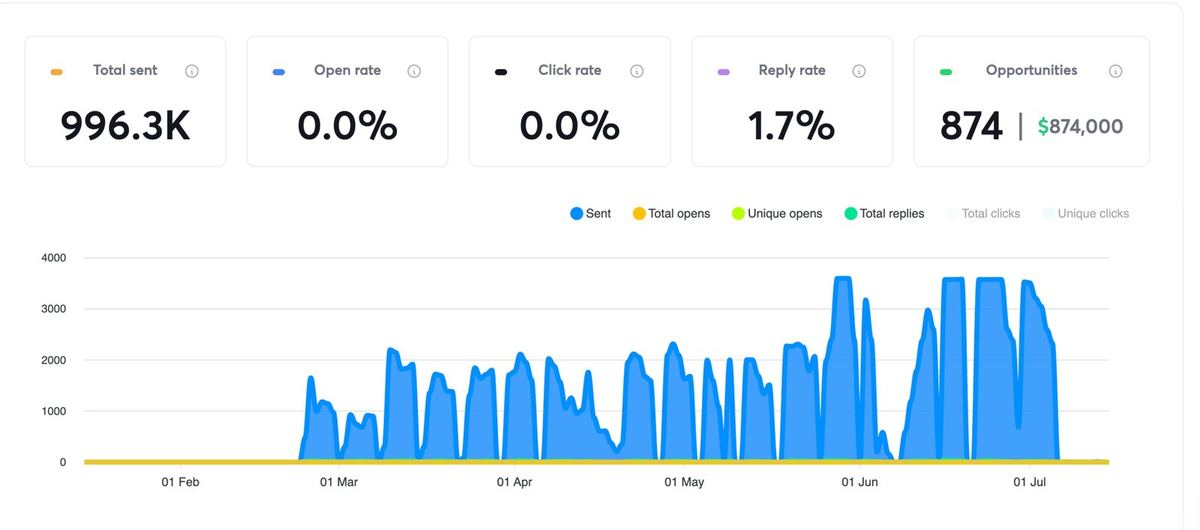
Good infrastructure is invisible. When it works, nobody talks about it, and the conversation moves on to lists and copy where it belongs. Sparq Labs' own engine has sent 996.3K emails from one workspace on this setup, and every client program starts from the same checklist.
Week one of both programmes covers exactly this machine and ends with your cost sheet. If you want to build all six on a live account with someone reviewing them, there are two programmes. In India, Lieutenant is eight weeks with weekly 1:1 co-builds with Nish on your own pipeline, at ₹3.8L including GST, with EMI over 12–24 months. Outside India, the International Programme runs the same curriculum in two time-zone slots at $6,000. Both are compared on the pricing page. The next machine, the list, starts with the enrichment waterfall.