"GTM engineer" became a job title before it became a job description. Ask ten hiring managers what one does and you get ten answers, and most of them are a list of tools: Clay, Apollo, a sequencer, an AI subscription. Tools change every quarter. The work they serve changes slowly. So this piece describes the role by what it ships, how the week runs, and how you can tell whether you are doing it.
Everything here comes from how we run outbound at Sparq Labs, the agency GTME.School is attached to, and from the six machines every program here teaches. Where a number appears, it comes from a sending dashboard or a client report.
The job is six machines
At Sparq Labs we break outbound into six machines. A GTM engineer owns all six, end to end. Each machine takes an input, produces an output, and has one number that tells you whether it works. If you can name that number for every machine on your account, you understand the job.
| Machine | What it ships | The number you watch |
|---|---|---|
| M1 Sending infrastructure | Domains, mailboxes, warm-up and daily limits | Bounces and spam placement |
| M2 List engine | An ICP written as signals, run as a Clay table with an enrichment waterfall | Credits spent per row that actually got sent to |
| M3 Research agent | One first line per account, written from evidence | Share of first lines you would send without editing |
| M4 Copy and cadence | Three plain-text steps by segment | Reply rate by segment |
| M5 Reply and booking | Replies classified, answered and handed off | Time to first response, calls held |
| M6 Dashboard and attribution | The weekly scoreboard | Opportunities by segment |
M1: Sending infrastructure
Nothing downstream matters if the email lands in spam. This machine is the secondary domains, the mailboxes on them, SPF, DKIM and DMARC, warm-up, and conservative daily limits per mailbox. We never send cold email from the main company domain. The full setup and the checklist we run before launch are in Sending infrastructure: domains, mailboxes and warm-up.
M2: List engine
The list decides more outcomes than any other machine. "Fast-growing B2B SaaS" is an adjective. "Hiring three SDRs this month" is a signal a table can check. The GTM engineer rewrites the ICP as signals, then builds a Clay table that runs the cheap deterministic steps first: firmographic filter, signal check, contact find, an email waterfall, and AI research last. Rows that fail a cheap check never reach a paid column. The order and the reasoning are in The enrichment waterfall.
M3: Research agent
An AI step, usually a Claude agent, reads each account's evidence: the careers page, LinkedIn job posts, the tech stack. It writes one first line per account from what it found. If it finds nothing usable, the account gets no line and drops out of the campaign. That rule matters more than the prompt. An agent that invents a reason to write is worse than no agent.
M4: Copy and cadence
Our default is three plain-text steps on days 0, 3 and 7. The first sentence says why you are writing now. One sentence names the problem that trigger usually creates. Step one has no link and asks a question that is easy to answer. Step two takes a different angle on the same trigger. Step three is a polite close-out. The reasoning is in The three-step cadence we write by.
M5: Reply and booking
Replies get sorted into a small set of buckets: interested, not now, wrong person, unsubscribe, out of office. Positives get answered in minutes. A "wrong person" reply becomes a new contact on the same account. The hand-off to a human carries the context: the signal, the first line, the reply. Tools like n8n handle the routing and a CRM such as HubSpot receives the record.
M6: Dashboard and attribution
The last machine is the scoreboard someone senior actually reads. Sent, replies, positive replies and opportunities, broken out by segment and campaign, read straight from the sequencer. Its job is to force a decision every week: what to cut, what to double, and what to test next.
The week is a loop
Once the machines exist, the job becomes a loop. Signals feed the list. The list feeds the agent. The agent feeds the copy. The sequencer sends. Replies come back. The dashboard tells you what to cut and what to scale, and the next week starts from that decision.
Here is how a typical week runs on an account where all six machines are live. The days move around. The order mostly does not.
- Monday: read the scoreboard. Pull last week's numbers by segment. Kill the campaign that has had a fair run and produced nothing. Note which segment is producing positives and why. Write down the one test for this week.
- Tuesday: list work. Build or extend the segment the test needs. Add a signal column, re-run the waterfall on new rows, count credits per qualified row. Pull a sample of twenty rows and check them by hand.
- Wednesday: agent and copy. Read the research agent's first lines for the new rows. Fix the prompt or the evidence fields where lines are generic. Write the new angle for step two if the test needs one.
- Thursday: infrastructure and launch. Check mailbox health, bounce rates and any domains still in warm-up. Load the campaign, confirm the daily limits and rotation, and launch.
- Friday: the write-up. A short note for the founder or VP Sales: what was sent, what came back, what changed, and what happens next week.
- Every day: replies. Checked several times a day. Positives answered in minutes. Nothing interesting waits until tomorrow.
A good week is mostly Monday. The building happens once. The deciding happens every week, and it compounds.
Most of the leverage is in deciding what not to send.
One day, start to finish
The title promised a day, so here is one. Take a Tuesday on an account selling to B2B companies that are building out a sales team. The scoreboard on Monday showed one segment producing positives: companies with open SDR roles. The decision was to extend that segment and pause a wider one.
Morning: replies first. The day starts in the inbox the sequencer feeds. Two positives came in overnight. Both get an answer before anything else, with a suggested time and a calendar link. One "wrong person" reply names the head of sales, who becomes a new contact on the same account. An out-of-office gets a later follow-up date.
Late morning: the list. The Clay table gets a new source of accounts. The firmographic filter runs first and removes most of them. The signal check looks for open SDR roles posted recently. Only the accounts that pass get a contact find and an email waterfall. Before any AI column runs, twenty rows get checked by hand. Three are agencies hiring for a client, which is the wrong buyer, so a new filter goes in above the paid steps.
Afternoon: the agent. The research agent runs on the rows that survived. Its first lines get read in a batch. Most are specific. A handful just restate the job title, which means the evidence field is pulling the wrong part of the job post. The field gets fixed and those rows re-run.
Evening: replies again, and a note. One more pass through replies. Then three lines in the running log: what changed in the table, why, and what Thursday's launch depends on.
Nothing in that day is glamorous. Each step removed a reason the campaign could fail.
Where the results come from
If you look across the Sparq Labs case studies, the biggest jumps rarely come from rewriting sentences. They come from changing who the campaign writes to, and why now.
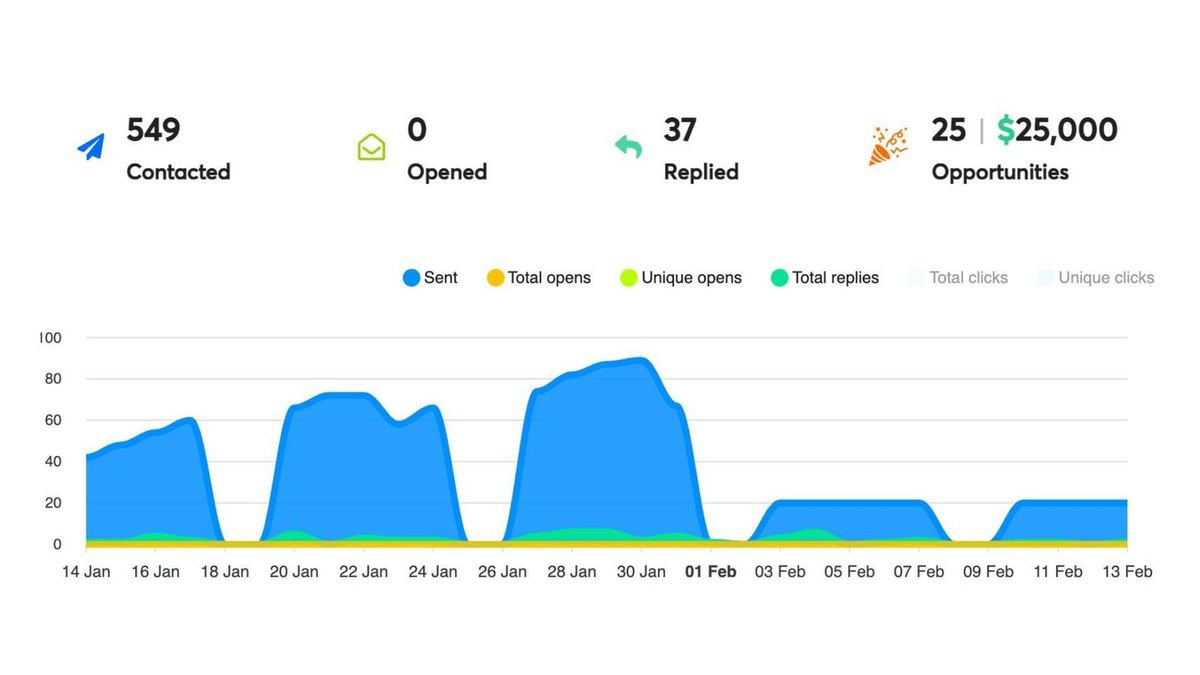
HappyFolks, an HR tech SaaS in India, ran eight wide test campaigns at under 0.3% reply rate. The refined campaign went narrow on one segment and reached a 6.7% reply rate: 549 contacts, 37 replies and 25 opportunities.
FilterKing, an industrial HVAC filtration company, kept the same copy and rebuilt the list. One campaign sent 20,636 emails, got 161 replies (2.2% of contacted) and produced 76 opportunities, because 47% of the replies became opportunities. A low reply rate on the right list beat a higher one on the wrong list.
Sufix Tech took a VA-staffing pitch from a 0.84% to a 6.0% reply rate by writing to agencies with open roles. The change was a hiring signal in the list engine.
Sparq Labs' own engine has sent 996.3K emails from one workspace, at a 1.7% reply rate across every send, and produced 874 opportunities. The best single campaign reached 15.2%. That spread between the average and the best campaign is the case for the Monday decision: find what works, and send more of it.
The pattern across all four is the same. M2 and M6 did most of the work. The GTM engineer's week should be weighted the same way.
How it differs from SDR and RevOps
The role overlaps with two jobs people already know, which is why it gets confused with both.
| Role | Owns | Accountable for |
|---|---|---|
| SDR | Running a sequence someone else designed, working replies, booking calls | Activity and meetings booked |
| RevOps | The CRM, routing rules, data hygiene, reporting | Clean data and reliable pipeline reporting |
| GTM engineer | The system the sequence runs on: infrastructure, list, agent, copy, replies, dashboard | The numbers the system produces |
An SDR runs a sequence. A GTM engineer designs the system the sequence runs on and answers for its output. Many good GTM engineers started as SDRs, because they already know what a buyer sounds like on a bad day.
Two misreadings come up often. The first is that the role is prompt engineering for sales. The AI steps are maybe a fifth of the work. Deliverability, list quality and reply speed decide more outcomes than any prompt. The second is that it is a pure ops role. The person who builds the machine has to understand the buyer well enough to write to them. If you cannot write the trigger line yourself, you cannot judge whether the agent wrote a good one.
The skills, in the order things break
When a new GTM engineer's numbers are bad, the cause is usually near the top of this list. Learn them in this order.
- Deliverability basics. Secondary domains, authentication, warm-up, limits, bounce monitoring. If this is wrong, every other skill is wasted.
- Thinking in signals. Turning "who we sell to" into checks a table can run: a job post, a new leader, funding, a tool change.
- Table building and credit discipline. Clay tables, waterfalls, and filters placed early so paid steps only touch rows that might be sent to.
- Writing short. Three sentences that a stranger will answer. Most people write three paragraphs.
- Prompting from evidence. Giving the agent specific fields to read and a clear rule for when to write nothing.
- Glue. Webhooks, n8n flows, CRM hand-off. Enough to move a reply from the sequencer to a human without a copy-paste step.
- Reading a dashboard and making a call. The hardest one, because it means stopping work you built.
You do not need to code. The machines here are built in Clay, Claude and a sequencer. Where a script helps, you use it and learn what it does.
Mistakes we see in new GTM engineers
- Starting with the AI step. The agent gets built first because it is the fun part. Then it writes great first lines for a list that should never have been pulled.
- Testing words before segments. A/B testing subject lines rarely moves much. Testing the segment, the trigger and the offer does.
- Sending from the main domain. One bad week can hurt the domain the whole company uses for invoices and customer email.
- Running expensive columns on every row. If the table spends heavily on rows that get filtered out at the end, the filter is in the wrong place.
- Slow replies. A positive reply answered the next afternoon has often gone cold. Speed is a machine, and it needs an owner.
- A dashboard nobody reads. Opens and sends feel like progress. The scoreboard should lead with replies, positives and opportunities by segment.
- Collecting tools. Every new tool adds a seat cost and a place for data to go stale. Add one only when a machine needs it.
How to tell if you are doing the job
Here is a simple test. Could you show a hiring manager or a client a dashboard, on a named account, with sends, replies and booked calls you produced, and explain every machine that produced them? If yes, you are doing the job, whatever your title says. If no, the gap is usually one or two machines you have never owned end to end.
That dashboard is also the best portfolio in this field. A certificate asks someone to trust you. A live campaign with numbers on it lets them check. Every GTME.School student leaves the programme with exactly this: six machines documented, the numbers they produced on a named account, and a recorded Demo Day to send instead of a CV.
Where to start
Pick one segment you can describe as a signal. Build the machines in order: a clean sending setup, a small list from that signal, an agent that writes from evidence, a three-step sequence, a reply routine, and a scoreboard. Send. Then spend your Mondays deciding what to cut.
If you want to build all six on a live account with someone reviewing them, there are two programmes. In India, Lieutenant is eight weeks with weekly 1:1 co-builds with Nish on your own pipeline, at ₹3.8L including GST, with EMI over 12–24 months. Outside India, the International Programme runs the same curriculum in two time-zone slots at $6,000. Both are compared on the pricing page.