Our default cold email sequence is three plain-text steps, sent on days 0, 3 and 7. It is short on purpose. Longer sequences mostly add volume to people who were never going to reply, and that volume costs mailbox capacity and reputation. The three rules behind step one are simple: the trigger line comes first, the pain gets one line, and there is no link. This post explains the reasoning behind each rule, walks through all three steps with sample emails, and covers how we test and the mistakes we see most. Every example uses fictional companies. The numbers come from Sparq Labs sending dashboards.
The shape of the sequence
| Step | Day | Its job | Length |
|---|---|---|---|
| 1 | 0 | Say why now, name one pain, ask an easy question | Four short lines |
| 2 | 3 | A different angle on the same trigger | Shorter than step one |
| 3 | 7 | Close the loop and make "not now" easy to say | Two or three sentences |
All three are plain text. No images, no HTML templates, no logo in the signature. Steps two and three go as replies in the same thread, so the reader sees the original email underneath. The sequence stops the moment anyone replies, whatever the reply says.
The sequence sits on top of two machines that come before it. The list engine (M2) decides who gets it and supplies the evidence for the opening line. The research agent (M3) turns that evidence into a first line. If you have not built those yet, start with the enrichment waterfall. Copy cannot rescue a list with no reason to write.
Rule 1: the trigger line comes first
The first sentence says why you are writing now. They are hiring three SDRs. A new VP Sales started. They just added a tool. It is a fact about their company, from this month, that the reader can check.
The trigger line does two jobs. It proves the email was written for them, which earns the next ten seconds of attention. And it sets up the pain line, because a real event usually creates a real problem.
| Weak opener | Why it fails | Trigger line |
|---|---|---|
| "Hope you're doing well." | Says nothing, reads as a template | "Saw fintech-saas.io has three SDR roles open." |
| "I came across your profile and was impressed." | Flattery with no evidence | "Congrats on the VP Sales move at logitech-ops.com." |
| "We help companies like yours scale outbound." | About the sender, no reason for now | "Noticed hrtech-labs.in just started using Clay." |
Here is the test we apply. If you cannot write that sentence from real evidence, the account probably should not be in this campaign yet. In our tables the research agent is allowed to return "NONE" when the evidence is thin, and those rows go to review. That single rule removes most of the generic openers before a human ever sees them.
Rule 2: one line of pain
One sentence on the problem that trigger usually creates. One. Three pains read like a brochure, and a paragraph about your company reads like an ad. The reader should recognise their own week in the sentence.
Each trigger has a pain that tends to come with it. These are the pairings we write from most often:
- Hiring several SDRs → ramp is the cost. New reps take months to produce pipeline while they learn the tools.
- A new sales leader → they are expected to show pipeline in their first 90 days, often with a team they did not build.
- A new tool in the stack → the seats are paid for and reply rates have not moved yet. The skills lag the tools.
Write the pain as an observation about teams in their position, with a soft word like "usually". "Your SDRs are failing" is an accusation from a stranger. "When a team hires three at once, the first quarter usually goes on ramp" describes a pattern they can agree with without feeling judged.
Rule 3: no link in step one
There are two reasons for this rule.
The first is deliverability. Links in a first-touch cold email from a new sending domain can hurt inbox placement. Tracking links and calendar links make it worse. Step one is the email that has to land, so we keep it as plain as possible. The sending infrastructure post covers the rest of that setup.
The second is the ask. A link turns a conversation into a click, and a click is a bigger commitment than a reply. Ask a question that is easy to answer with a yes, a no, or "not now". Good asks for step one:
- "Is ramping the new reps on your plate, or someone else's?"
- "Worth a short call to compare notes?"
- "Would it help if I sent over how we'd set it up?"
The third one asks permission to send something. When they say yes, the link goes in your reply, inside a conversation they started. That reply goes to someone who is expecting it.
Keep the signature to a name and a company. A website in the signature is a link too.
Step one, line by line
Here is a full step one for a fictional seller who helps new SDRs get productive faster. The target is the head of sales at fintech-saas.io, which has three SDR roles open.
Subject: 3 sdr roles

Hi {{first_name}},

Saw fintech-saas.io has three SDR roles open right now.

When a team hires three at once, the first quarter usually goes on
ramp, with new reps learning the tools while pipeline waits.

We get new reps building and sending their own campaign in their
first weeks, on your accounts.

Is ramping them on your plate, or someone else's?

{{sender_name}}
{{sender_company}}
Line by line:
- Subject. Two or three words, lowercase, about their trigger. It reads like an internal note. A subject about your product reads like a pitch before the email is open.
- Line one, the trigger. One fact, checkable on their careers page. The research agent wrote it from the evidence column.
- Line two, the pain. One sentence, framed as a pattern with "usually". It connects the trigger to a cost they already feel.
- Line three, the offer. One sentence on what you do, tied to that pain. No feature list and no client logos.
- Line four, the ask. A question with an easy answer. "Someone else's" is a fine reply, because it tells you who to write to next.
- Signature. Name and company as plain text.
Read it on a phone before you ship it. If it needs scrolling, cut.
Step two, day 3: a new angle
Step two takes a different angle on the same trigger and is shorter than step one. It goes in the same thread, so the first email sits underneath for context.
{{first_name}}, one more thought on the SDR hires.

The reps who ramp fastest usually build their own list and copy in
week one, instead of shadowing for a month.

Want me to send the week-one plan we use?- The opener refers back to the trigger without repeating it.
- The middle line moves the angle from the problem (ramp takes time) to a view on how it gets solved. That gives someone who ignored the pain line a second reason to reply.
- The ask offers something useful. It is still a yes or no question, and the asset only goes out after a yes.
Offering a useful asset in the ask is one of the strongest moves we have. WiseMango's lead-magnet campaign had 61.5% of its replies come back positive.

Avoid "just bumping this" and "following up on my last email". Both ask the reader to go back and do work. A new angle gives them a reason to answer now.
Step three, day 7: the polite close
Step three closes the loop. Its job is to make "not now" easy to say.
{{first_name}}, I'll leave this here.

If ramping the new SDRs is handled, no need to reply. If it comes up
next quarter, a quick "not now" helps too, and I'll check back then.
These often get replies, because they lower the stakes. Nobody has to agree to a call. They only have to tell you where things stand, and many people would rather close the loop than leave it open.
A "not now" is a useful reply. Log it in HubSpot with a date, and the account goes back into the list engine for a fresh signal check at that point. When you write again, open with whatever has changed since.
Keep the tone neutral. "I guess this isn't a priority" or "I'll assume you're not interested" reads as passive-aggressive, and it gets ignored or reported.
Why three steps, and why these days
Three steps is enough to say why now, try a second angle, and close. Steps four, five and six mostly reach people who have already decided not to reply. Every extra step uses sends from the daily limits you set on each mailbox in M1. A send spent on step six to a silent contact is a send that could have gone to a new account with a fresh trigger. More sends to uninterested people also raise the odds of spam complaints, which hurt every campaign on that domain.
The spacing follows the same logic. Day 3 is close enough that step one is still in recent memory. Day 7 gives a full working week, so someone who was travelling or busy has had a chance to surface. After day 7, a silent contact rests. They come back only with a new trigger, which means a new reason to write.
Test the segment before the sentence
A/B testing word choices rarely moves much. Testing the segment, the trigger and the offer does. We test in this order:
- Segment. Who gets the email: industry, size, region, role.
- Trigger. Which event opens the email, and whether the evidence for it is strong.
- Offer. What the ask asks for: a call, an asset, an intro to the right person.
- Wording. Only once the first three are working.
The case studies behind this school show why that order holds.
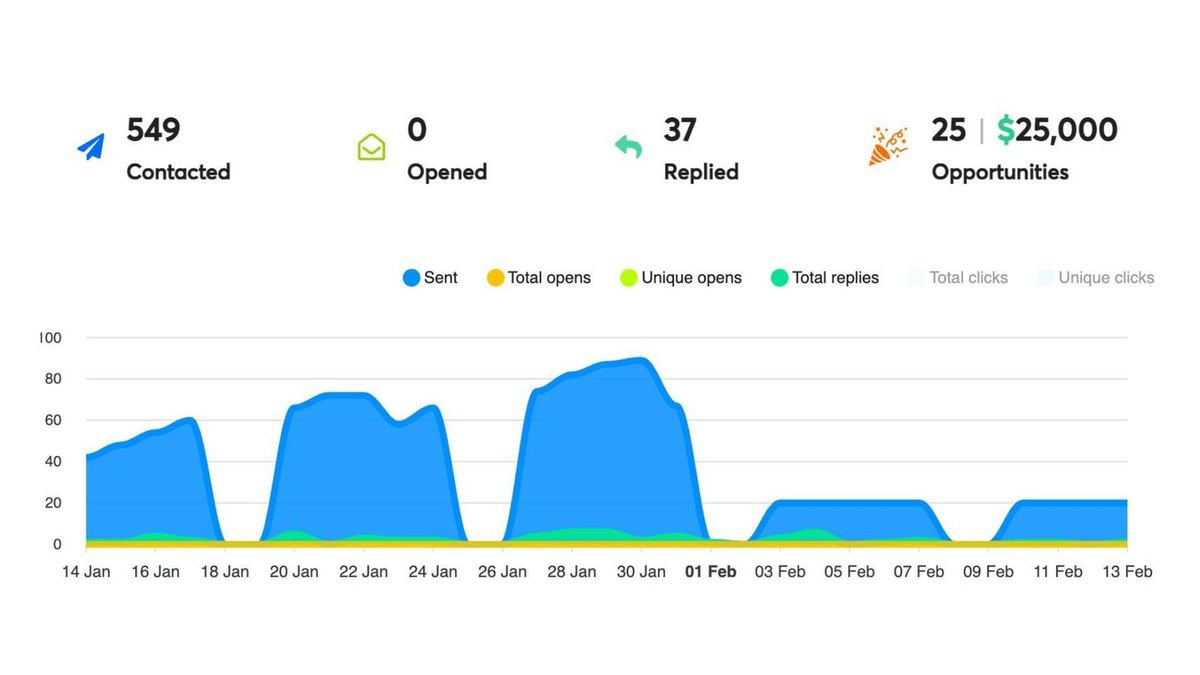
- HappyFolks ran eight wide test campaigns, around 23K emails, at under 0.3%. A narrower campaign reached a 6.7% reply rate, with 25 opportunities from 549 contacts.
- Sufix Tech went from 0.84% to 6.0% on a VA-staffing pitch by writing to agencies with open roles, a hiring signal.
- FilterKing kept the old copy and rebuilt the list. One campaign produced 76 opportunities, and 47% of its replies became opportunities.
- Think Macro tested three verticals in parallel at 5.3%.
The first three moved by changing who they wrote to. Sparq Labs' own workspace shows the same spread: 996.3K emails at a 1.7% reply rate across every send, 874 opportunities, and a best single campaign at 15.2%. That spread, inside one workspace with the same machines, is why we spend testing time on the list and the trigger first.
How to run a test
- Change one thing per test. Two segments with the same copy, or one segment with two triggers.
- Split inside the same sending window and the same mailboxes, so infrastructure is not the variable.
- Read reply rate, then the share of replies that are positive, then opportunities. A campaign with a modest reply rate can win on opportunities, as FilterKing did.
- Wait for enough sends that a single reply does not swing the result before you call a winner.
Common mistakes
- Opening with yourself. "I'm the founder of..." spends the most valuable line on the sender.
- Three pains in one email. The reader recognises none of them. Pick the one the trigger creates.
- A calendar link in step one. It hurts placement and asks for a commitment before there is a conversation.
- A trigger with no evidence. "Saw you're growing fast" is a guess. If the table has no evidence, the row should not be sent.
- "Just bumping this" as step two. A wasted send. Bring a new angle.
- One sequence for every segment. Different segments have different triggers and different pains. Write one sequence per segment.
- Testing subject lines on a weak list. No subject line fixes a list with no reason to write.
- Slow replies. A positive reply that waits a day goes cold. Classify and answer in minutes; that is M5.
The pre-send checklist
- Every row has a trigger line written from stored evidence. Rows with "NONE" are out.
- Step one has four lines: trigger, one pain, one offer line, an easy question.
- No links anywhere in step one, including the signature.
- The subject is two or three lowercase words about the trigger.
- Step two is shorter than step one and brings a new angle in the same thread.
- Step three makes "not now" easy and has no guilt in it.
- Steps are set for days 0, 3 and 7, and the sequence stops on any reply.
- Each segment has its own sequence, and the test changes one variable.
- Someone owns replies, with a plan to answer positives in minutes and log "not now" with a date.
Practise it on a live account
The cadence is M4 of the six machines, and it is the point where a build starts sending. In week 4 of both programmes, your three-step sequence for your segment gets rewritten live and the send goes out that week. Demo Day in week 8 is where you defend its numbers. If you want to build all six on a live account with someone reviewing them, there are two programmes. In India, Lieutenant is eight weeks with weekly 1:1 co-builds with Nish on your own pipeline, at ₹3.8L including GST, with EMI over 12–24 months. Outside India, the International Programme runs the same curriculum in two time-zone slots at $6,000. Both are compared on the pricing page. Or read the enrichment waterfall to build the list this sequence depends on.